en
en
 Deutsch
 French
 Russian
 Spanish
 Portugues
 Japanese
 Korean
 Turkey
 Italy
Italy Poland
 Indonesia
 Arabic
 India
India Thailand
 Malaysia
 Filipino
 China
China Taiwan
 Vietnam
 Netherlands
 Sweden
 Norway
 Denmark
Glasses-free 3D displays: what you actually get
After our review of vr-glasses, the next question came: what about 3D without any glasses at all? Samsung, Acer, Lenovo, Sony and ZTE all sell monitors, laptops and tablets that promise a three-dimensional picture to the naked eye. The idea sounds perfect. No glasses, no batteries, no flicker. Just sit and look.
We collected reviews from the technical press, owner complaints from forums, independent laboratory measurements and published research on visual comfort. Then we put the manufacturers' claims next to them. The result is below.
As before, no hype and no emotions. Only optics, arithmetic and what people who actually bought these devices report. Every number here can be checked with a calculator, and every complaint has a source at the end of the page.
The glasses-free 3D display is not a 3D monitor without glasses. It is an ordinary 2D panel with a lens sheet glued on top. Read on to understand problems with this concept, before you buy.
How it works
To show you two separate images (left and right), the panel displays them in alternating pixel columns. As a result, the resolution immediately drops by half. And that is the best case. Manufacturers mislead you from the first step. They write "4K panel". Yes, that is true, but they all forget to mention that the 3D picture will not be 4K... What a curious bit of forgetfulness.As you can see in the image below, the lenses must be set at different angles so that the photons from each pixel land exactly in your pupil. If you move your head even slightly, the image turns into chaos. Keep in mind that lenses cannot be made with perfect precision, so light beem begin to scatter and create false images. This effect is called crosstalk.
For example, 3D glasses let you see the full resolution without any compromises. 3D glasses do this by alternately blocking the light from L and R side. A glasses-free display has to do it at the screen, by sending the pixels beem directly to complementary eye.
The panel itself is completely ordinary. The left and right images are cut into narrow vertical strips and interleaved column by column: left, right, left, right. An micro lenses layer on top of the panel then decides in which direction the light of each column leaves the screen.
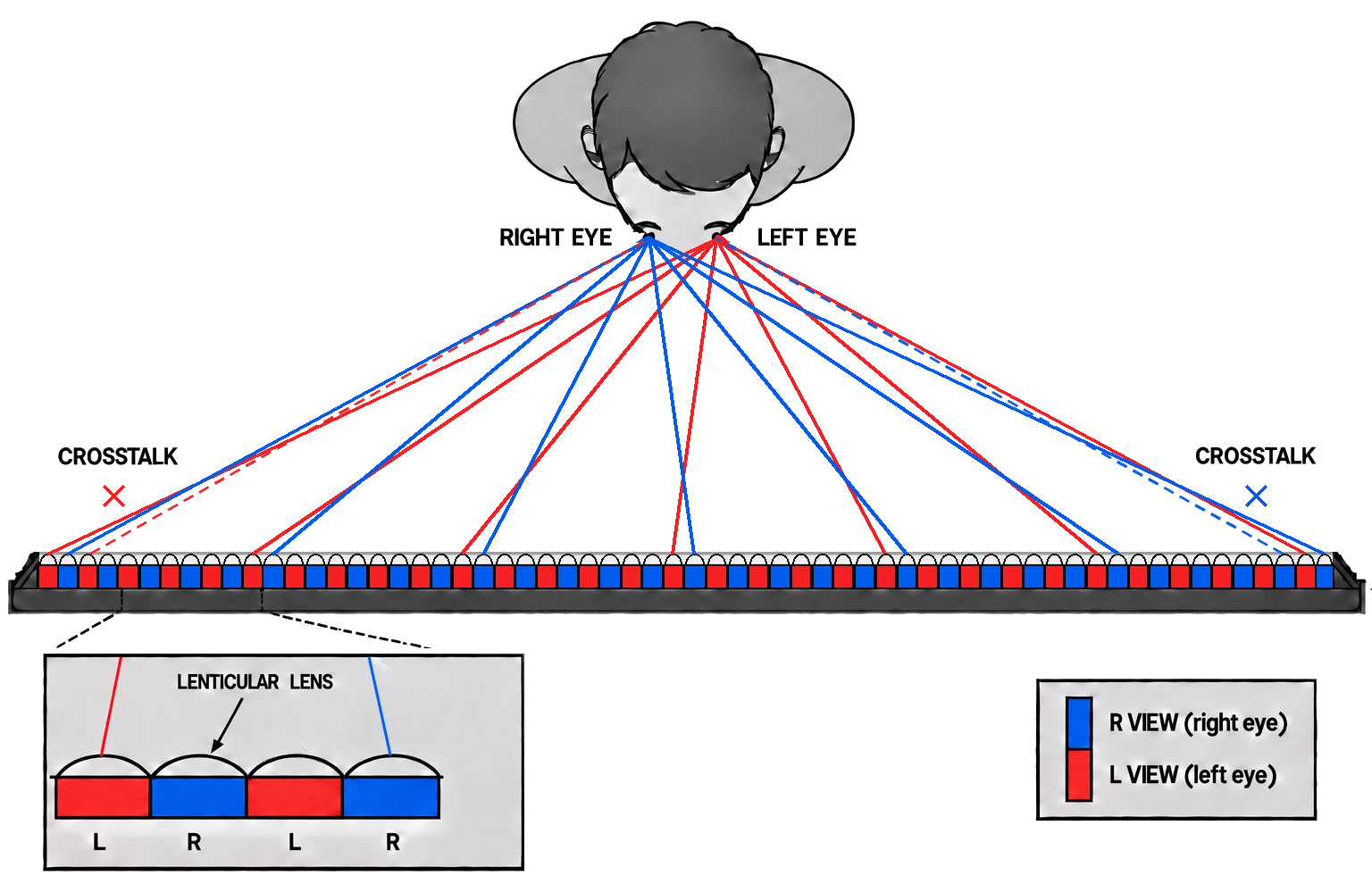
Lenticular lens
A sheet of tiny cylindrical lenses, one lens over each racurs of pixels group. Each lens bends the light of its columns toward a specific direction. It loses less light than a barrier and is used in almost every current monitor or tablet. However, in this case, the best focal area is at a certain distance from the display. If you look closer or farther away, the image quality will deteriorate significantly.
Switchable lens
A liquid-crystal version of the same lens sheet. When it is switched off, the panel works as a normal 2D screen. When it is switched on, the lens appears. Acer SpatialLabs View 27 and Lenovo ThinkVision 27 3D use this. It solves the 2D problem only partially, as you will see below.
Two families of devices
Everything on the market falls into one of two groups.
Eye-tracked
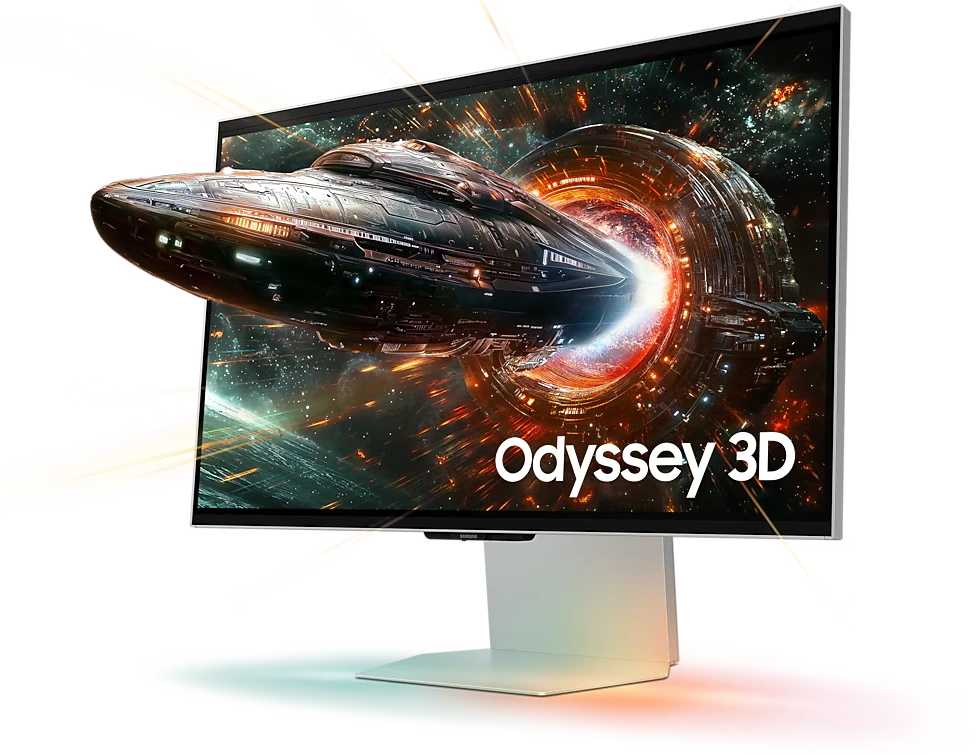
A camera mounted on the display watches you and tracks the position of your eyes, while the software shifts the image across the pixels so that the light from each group of pixels always reaches the correct eye. This is how the Samsung Odyssey 3D, Acer SpatialLabs, Lenovo ThinkVision 27 3D, Sony Spatial Reality Display and Nubia Pad 3D work. At best, each eye gets half resolution of the screen.
Parallax barrier
A layer of thin opaque stripes in front of the panel, like a fence. Through the gaps the left eye sees only the left columns and the right eye only the right ones. Simple and cheap, but the fence blocks a large part of the light. The Nintendo 3DS used this old method.
Multi-view The panel is split into many views fanned out in front of the screen, 9 on the Toshiba 55ZL2 television, 45 on Looking Glass. Several people can look at once, but every view receives only a small fraction of the pixels.
In both cases the light leaves the screen in narrow fans. Between them there is always a boundary where the left and right fans overlap. If your eye lands there, it sees both pictures at once. That is crosstalk, and it is built into the physics of the method.
If an untracked display is viewed from the wrong position, the left eye can land in the fan meant for the right eye. Then the brain receives the views swapped, and the depth turns inside out: near objects appear far, far objects appear near. A Sound & Vision reviewer recalls exactly this 3D inversion on prototype glasses-free TVs without eye tracking.
Half the pixels, at best
This is pure arithmetic and no marketing can change it. The panel has a fixed number of pixel columns. If two views share them, each eye receives half. If nine views share them, each view receives one ninth.| Device | 2D | 3D per eye |
| Nintendo 3DS: | 800x240 | 400x240 |
| Toshiba Qosmio F750 laptop: | 1920x1080 | 1366x768 |
| Samsung Odyssey 3D 27": | 3840x2160 | 1920x2160 |
| Lenovo ThinkVision 27 3D: | 3840x2160 | 1920x2160 |
| Acer SpatialLabs View 27: | 3840x2160 | "2K per eye", Acer's own spec |
| Looking Glass: | panel | 1/45 of the panel per view |
Let us translate this into PPD
In our review of display glasses we used PPD, pixels per degree of your field of view, as the only honest measure of sharpness. A 27" 4K monitor at 60 cm gives about 73 PPD. The same panel in 3D mode gives each eye only 1920 pixels horizontally across the same 53 degrees: about 36 PPD.
That is below the XREAL One Pro from our previous table (38 PPD), which we already rated poor, and far below the 60 PPD at which the eye stops seeing the pixel structure. And 60 cm is not our choice. According to the Stuff reviewer, Samsung itself names 60 cm as a good viewing distance for the Odyssey 3D, and closer than that the graininess of the lenticular layer becomes noticeable. So at the distance the manufacturer recommends you get 36 PPD.
What reviewers actually saw
The Stuff reviewer of the Odyssey 3D wrote that even when everything worked as intended, the picture looked fuzzier than on a regular 2D display.
The most telling case is the Sony Spatial Reality Display. The panel is 4K. The UCSF ChimeraX team measured how small a label could still be read in 3D mode and concluded that the perceived resolution was slightly worse than HD. A 4K panel that looks like less than 1280x720.
Multi-view displays lose even more. A Looking Glass panel is shared between 45 views, so each view receives one forty-fifth of the pixels. A TechRadar reviewer of the Toshiba 55ZL2 television explained why it needed a 4K panel at all: only that resolution was enough for glasses-free 3D to look anything like HD.
Ghosting: the double image
Crosstalk, or ghosting, is the parasitic leakage between the left and right images. You see it as a faint second outline next to every high-contrast edge. Text gets a shadow, a white object on a black background gets a twin.In glasses-free displays crosstalk is not a defect of a particular model, it is a consequence of the method. The lens cannot send the light beem perfectly to the eye. There will always be scatter and light leakage, which you can see, especially in bright scenes.
How much crosstalk is too much
| Threshold of crosstalk visibility (Andrew Woods review) | about 1..2% |
| Recommended value for visual comfort (NTUST study) | 2.5% |
| "Acceptable for sustained use", Alibaba seller guide | under 5% |
| Typical models at the optimal distance, same guide | 3..7% |
What owners report
On the Acer SpatialLabs View 27 crosstalk is visible on text as a faint shadow behind the letters. The Stuff reviewer of the Odyssey 3D had moments where the two images overlapped. The Galaxus reviewer of the same monitor saw ghosting artefacts with the naked eye even while the eye tracking was working correctly.
Samsung's own data sheet promises the Odyssey 3D "the industry's best 3D picture quality". That may even be true. It only shows how low the bar is for the whole industry.
Eye tracking: the weakest link
In eye-tracked displays the light fans are narrow and they must follow your eyes. The camera has to find your pupils, the computer has to calculate their position, the image has to be re-interleaved, and the panel has to show the new frame. All of this takes time. While it happens, your eyes are already elsewhere, at the boundary of the fans. You see ghostng.The camera alone is already slow
Acer publishes the specification of its tracking sensor: 1280x480 at 60 frames per second. That means a new position of your eyes arrives at most once every 16.7 ms, before any processing, before the image is re-interleaved and before the panel draws the new frame.
The measurement
The UCSF ChimeraX team measured the result on the Sony Spatial Reality Display. With a slow sideways head movement of about 1 cm per second there was almost no ghosting. At about 5 cm per second the tracking fell behind, and both eyes saw a ghost almost as bright as the main image. 5 cm per second is not a fast movement. It is an ordinary turn of the head toward.
The manufacturer admits it
A Lenovo technical expert explained in an interview for ZOL: the display must first find the eyes, then interleave the image, and this process has a delay. When the delay is too large, the mismatch with how we see real objects causes discomfort, dizziness and fatigue. That is a direct statement from the manufacturer of one of these monitors.
When tracking fails
Light Acer specifies that its tracking works between 10 and 1800 lux, and that in extreme low light the maximum viewing distance falls from 270 to 150 cm. You won't be able to go sit on the couch.
Other people
The Galaxus reviewer notes that the Odyssey 3D works reliably only as long as several people around do not confuse the eye tracking.
Unstable behaviour.
A Tom's Guide editor reports that the 3D effect on his SpatialLabs View 27 unit did not work well for weeks, and then suddenly started working almost perfectly. Rtings also lists that the 3D capability of the Odyssey 3D does not always work properly.
Old systems
A Toshiba Qosmio F750 review noted that the tracker needed up to a second to adjust the 3D image after the user moved.
Tracking is a computer-vision problem working in your room, with your lighting, your glasses and your family. Under the ideal conditions of a trade show booth it works. At home it is a lottery.
Sit still like a statue
Even with tracking, the zone in which 3D works is limited. Tom's Hardware warns that more than 25 degrees off centre the image of the Odyssey 3D no longer looks right. Acer gives a best viewing distance of 50 to 110 cm for the SpatialLabs View 27.Without per-eye tracking the zone is tiny. The Nintendo 3DS sweet spot was described by reviewers as pretty tight, and a Kotaku author explained that you must stay in the same position to see the effect, which makes it impossible to relax while playing.
The Toshiba 55ZL2 television had 9 views and a camera to locate the viewers, and still every review says the same thing. You have to sit with your head very still, otherwise distracting focus shifts run across all or part of the picture. Each of its views was only about 6.3 cm wide, roughly the distance between your eyes, and Toshiba recommended sitting 2.2 m from the screen.
Compare it with a monitor and shutter glasses: you can lean back, turn your head, put your feet on the desk, and each eye still sees its own full-resolution picture.
One viewer only
An eye-tracked display forms the picture for one pair of eyes. The light fans are pointed at you. A second person sitting next to you is outside those fans, and receives the wrong views or a mixture.This is not a software limitation that can be fixed with an update. It follows directly from how the picture is built. The UCSF ChimeraX tester of the Sony Spatial Reality Display describes the picture jumping when his wife tried to look at the screen next to him. An owner of the first Nubia Pad 3D wrote that the face must be detected at all times, so only one person can look, and for anyone else it turns into a mess.
Advertising says otherwise. ZTE claims that the 86-degree viewing angle of the Nubia Pad 3D II lets several people enjoy the 3D effect at once. At the same time, the device page of Leia, whose technology is inside the tablet, describes it as eye tracking that directs light beams to the individual eyes. Both statements cannot be true at once. We found no independent test of the second generation with several viewers.
Multi-view displays can show 3D to several people. The Toshiba 55ZL2 supported up to five viewing zones. They pay for it with a fraction of the resolution, as we calculated above.
The lens you can see
The lens sheet is a physical object glued on top of the pixels, and it does not stay invisible.Visible structure. On the Acer SpatialLabs the lens structure is not completely invisible, especially on bright areas. On the Odyssey 3D the Stuff reviewer noticed the graininess of the lenticular layer as soon as he sat closer than 60 cm.
Black stripes and moire. Between the subpixels of every LCD there is a black mask. Under certain angles a lens images this mask instead of the pixels, and the viewer sees dark stripes across the picture. Tilting the lenses relative to the pixel columns hides the stripes, but mixes neighbouring views and raises crosstalk. The designer can only choose which defect you get.
Even in 2D. The switchable lens of the ThinkVision 27 3D is meant to disappear in 2D mode. The TechRadar reviewer nevertheless saw tiny dots on the screen up close, and they gave white a faint grey tint at normal distance. You pay for a 2D monitor that is slightly worse than an ordinary one.
Mirror screens. The Galaxus reviewer calls the glossy screen of the Odyssey 3D extremely reflective. The ThinkVision 27 3D has a mirror-like surface, and on dark backgrounds reflections are visible. Owners describe the Nubia Pad 3D screen as highly reflective. On the Sony display the ceiling light was reflected straight into the tester's eyes, and switching it off was not an option either: in the dark the tracking fails.
Fast motion
Games are the main selling point of the new 3D monitors. Yet TweakTown, reviewing the Odyssey 3D, liked the idea but found the execution somewhat distracting, and measured a performance hit in 3D mode. Their conclusion: technically impressive, but not practically useful.Galaxus came to a similar result with the Acer SpatialLabs laptop: for shooters the solution is not suitable at all, and the additional strain on the eyes will put people off 3D gaming for a long time.
2D to 3D conversion
Almost every manufacturer solves the lack of 3D content the same way: a button that turns any flat video into 3D on the fly. ZTE promises to convert any 2D content into 3D in real time. Samsung advertises AI 3D video conversion for the Odyssey 3D.What owners see: on the Nubia Pad 3D, converted videos show transparent halos around the outlines of people. A Chinese review of the In3D tablet put it plainly: real side-by-side 3D films look much better than anything converted from 2D.
We already explained this in the display glasses review: a second view that never existed in the clip can only be invented. Good conversion runs on a powerful PC GPU and takes hours for a short film. A tablet chip doing it in real time draws nonsense, not a correct second view.
Strain on the eyes
Removing the glasses does not remove the physiology. The vergence-accommodation conflict described in our previous review is fully present here: your eyes converge on an object floating in front of the screen, while focus stays fixed on the panel surface. On top of that come crosstalk and tracking latency.The largest experiment ever made
The Nintendo 3DS was a mass consumer device, so its owners give us the best statistics we have. A survey by Interpret found that 28% of 3DS owners said the 3D effect actually made the games worse, more than the 22% who said it made them better, and 13% always played with 3D switched off. In the same survey 37% of respondents reported dizziness and nausea from 3D displays. Soon after launch Nintendo had to answer reports of headaches and advised players to take breaks. A Kotaku author wrote that he stopped playing in 3D because of tired eyes.
Current devices
A TechRadar editor felt eye strain after just five minutes of gaming on an Acer SpatialLabs display, and heard similar reports from colleagues. The Galaxus reviewer of the Odyssey 3D had to constantly refocus his eyes. A Chinese review of the ThinkVision 27 3D recommends not moving much and keeping sessions short to avoid visual fatigue. That is the advice of a reviewer who liked the monitor.
Let's compare devices
Samsung Odyssey 3D (27", 4K, $1,999)Eye-tracked lenticular, 1920x2160 per eye, 36 PPD at the recommended 60 cm. Fuzzier than 2D, moments where the images overlap, ghosting even with working tracking, an extremely reflective glossy screen, image wrong beyond 25 degrees off centre. Advertised as "the industry's best 3D picture quality".
Acer SpatialLabs View 27 and SpatialLabs laptops
Eye-tracked switchable lenticular. "2K per eye" from a 4K panel, by Acer's own specification. Visible crosstalk on text, visible lens structure on bright areas. Tracking sensor at 60 fps, limited by room lighting. Eye strain within minutes reported by TechRadar, unstable 3D for weeks on a Tom's Guide unit.
Lenovo ThinkVision 27 3D
Eye-tracked switchable lens, 1920x2160 per eye, announced at 2,999 euro and sold for $3,298.90 in the US. Mirror-like glossy surface, faint dots and greyish white even in 2D mode. Lenovo's own expert admits that tracking latency causes dizziness and fatigue.
Sony Spatial Reality Display
Eye-tracked, 4K panel. The only device here with a proper laboratory test. UCSF measured perceived resolution slightly worse than HD and strong ghosting at a head movement of about 5 cm per second. One viewer only, glare from ceiling lights.
Looking Glass
Multi-view, 45 views. Several people can look at once, but each view gets one forty-fifth of the pixels of the panel. The “soapy” image is of very poor quality.
Nubia Pad 3D, Nubia Pad 3D II, RedMagic Explorer 3D
One family, built on Leia technology. Eye-tracked, one viewer. Reflective screen, halos on converted video. One owner received a RedMagic Explorer 3D whose 3D looked flat and jittery, while his second unit worked; the faulty unit had default values in its calibration file. The second-generation Nubia claims +80% 3D resolution without explaining against what. Even a Leia staff member on their forum said the per-view resolution is more complicated than that number. The panel is still 2560x1600, so each eye can receive at most half of it.
Nintendo 3DS
Parallax barrier, no tracking in the original model, 400x240 per eye. Tight sweet spot, headaches, and more owners saying 3D made games worse than better. The best known glasses-free 3D device.
Toshiba 55ZL2 and Qosmio F750
The television cost about 7,000 pounds, had 9 views and required a perfectly still head. The laptop dropped from 1920x1080 in 2D to 1366x768 in 3D, and its tracker needed up to a second to react. These devices disappeared from the market. The problems did not.
Advertising vs reality
This market is full of claims that collapse on the first check. The most aggressive ones come from Chinese manufacturers and resellers, but a Korean "industry's best 3D picture quality" with visible ghosting is no better. Here is what we found."Naked-eye 3D" that is not 3D at all
Huge street billboards with whales and pandas jumping out of a building are sold as "naked-eye 3D LED displays". They are ordinary flat LED screens showing anamorphic video, an optical trick drawn for one specific viewing point. Industry press calls the term "naked-eye 3D LED" simple marketing misinformation. Step off that point and the effect disappears.
"Hologram"
On Alibaba the "3D Hologram Box" turns out to be a display cabinet with a transparent LCD. That is a flat 2D picture on transparent glass. There is no hologram and no stereo in it.
"World's first"
Chinese press presented the Lenovo ThinkVision 27 3D in 2024 as the world's first glasses-free 3D monitor. Eizo released its glasses-free 23" DuraVision FDF2301-3D back in 2010. ZTE calls the Nubia Pad 3D II "the world's first 5G + AI eyewear-free 3D tablet": a "first" that exists only thanks to a carefully chosen combination of words.
"4K 3D"
English marketing promises the ThinkVision 27 3D "4K clarity" in stereo. A Chinese article about the same monitor admits it in brackets: 4K in 2D, 2K in 3D.
"+80% resolution"
No method, no reference, no per-eye number. See above.
"Dizziness-free"
An 86" 8K glasses-free 3D advertising screen on Alibaba is sold as "dizziness-free". Lenovo's own expert explains that tracking latency causes dizziness and fatigue. There is no measurement behind such a claim, only a word in the title.
"Sub-10 ms tracking"
The same Alibaba guide promises eye tracking with less than 10 ms latency, without a source we could verify. Acer's own tracking camera delivers one frame every 16.7 ms, before any processing at all. The only independent measurement we found, by UCSF, shows ghosting at a head speed of 5 cm per second.
"Watch with friends"
An eye-tracked display is built for one pair of eyes. See the section on viewers.
Eye tracking that is not there
Some Chinese 3D phones were sold with a lenticular screen but with eye tracking disabled, the Elephone P8 3D, for example. Without tracking you get the tiny fixed sweet spot of the 3DS. The In3D tablet put buttons on the case to shift the parallax manually, so the user could move the double image himself.
Image quality in 3D mode
For reference, the first row is an ordinary 27" 4K monitor with active shutter glasses. Each eye receives the full panel, there is no lens sheet, no tracking and no sweet spot. PPD is calculated for a 27" screen at 60 cm, the same method as in our display glasses review.| Device | 3D per eye | PPD at distance |
Method | Viewers | Main problem | Quality |
| 27" 4K + shutter glasses | 3840x2160 | 73 65 cm |
3D glasses | any | need 3D glasses | excellent |
| Samsung Odyssey 3D | 1920x2160 | 36 65 cm |
lens, tracking | 1 | ghosting, glossy screen | tolerable |
| Lenovo ThinkVision 27 3D | 1920x2160 | 36 65 cm |
LC lens, tracking | 1 | latency, glossy screen | tolerable |
| Acer SpatialLabs View 27 | 2K | 36 65 cm |
LC lens, tracking | 1 | crosstalk on text | tolerable |
| Sony Spatial Reality | below HD, measured |
under 32 50 cm |
lens, tracking | 1 | ghost at 5 cm/s | poor |
| Nubia Pad 3D / 3D II | half of 2560x1600 at most |
33 max 40 cm |
lens, tracking | 1 | reflections, halos | poor |
| Toshiba 55ZL2 | 1/9 of panel (1280x720) |
37 2 m |
lens, 9 views | several | still head, focus shifts | very poor |
| Nintendo 3DS | 400x240 | 27 30 cm |
barrier | 1 | tight sweet spot | worst |
| Looking Glass | 1/45 of panel | 17 50 cm |
lens, 45 views | several | tiny share of pixels | terrible |
| "Naked-eye 3D" billboard | none | n/a | flat video | one point | not stereo at all | not 3D |
Questions to ask before buying
What is the resolution per eye in 3D mode?Not the panel, not "4K". The number of pixels each eye receives. If the seller does not know, divide the horizontal resolution by the number of views yourself.
Is there eye tracking, and for how many people?
If there is tracking, the honest answer is one.
What happens when I move my head quickly or look away?
Ask for a video filmed while moving, not a static demo.
Does tracking work in dim light and with prescription glasses?
Check it in your own room, not at the store.
Is the screen glossy?
And where are the windows and lamps in your room.
How much native 3D content is there?
If the answer is "AI converts everything", read the section on conversion again.
What are the return terms?
Whether your eyes accept this technology can only be checked after an hour of use.
Conclusion
A glasses-free 3D display trades the glasses for a set of compromises that never appear in the advertising. The lens sheet takes at least half of your pixels. Crosstalk is built into the method. Tracking works for one person, with a delay, under good lighting. The zone is narrow, the screen is often glossy, and the eyes get tired.The governing rule is the same as for VR-glasses: a lens cannot create pixels that are not in the media. Two views from one panel means half the pixels for each eye. Forty-five views means one forty-fifth.
Do not buy them if you want to:
Get 3D at the full resolution of the panel, you won't get it
Watch 3D together with family or friends, you won't, with eye tracking
Lean back, move and relax while watching, the 3D will fall apart
Play fast games in 3D for hours, expect ghosting and tired eyes
Turn your 2D library into real 3D with one button, it will be an imitation
You may buy them if you need to
Inspect static 3D models at your desk, show 3D at a trade show booth, or experiment with the technology while understanding its limits.
If your goal is high-quality 3D
A good large monitor or projector with active shutter glasses still gives each eye the full panel, for any number of viewers, without distortions. This is not marketing, it is the arithmetic of pixels.
Sources
UCSF ChimeraX, Sony Spatial Reality Display tests: resolution and ghosting
Stuff, Samsung Odyssey 3D review: 60 cm, graininess, overlapping images
Galaxus, Odyssey 3D tested: ghosting, reflections, refocusing
Tom's Hardware, Odyssey 3D review: 25 degree limit
Tom's Guide, Odyssey 3D review: inconsistent 3D effect
Rtings, Odyssey 3D review
PC Perspective on the TweakTown Odyssey 3D review
Samsung, Odyssey 3D data sheet: "industry's best 3D picture quality"
Sound & Vision, 3D inversion without eye tracking
Trusted Reviews, Acer Predator SpatialLabs View 27
Acer, SpatialLabs View 27 specification: 2K per eye, 60 fps tracking, lighting range
TechRadar, Acer SpatialLabs: eye strain after five minutes
Tom's Guide, SpatialLabs View 27: 3D not working well for weeks
Galaxus, Acer SpatialLabs laptop: not for shooters, eye strain
TechRadar, Lenovo ThinkVision 27 3D review
Serious Insights, ThinkVision 27 3D review: US price
Notebookcheck, ThinkVision 27 3D: 3D resolution and price
ZOL, Lenovo expert on tracking latency, dizziness and fatigue (Chinese)
Zhihu, ThinkVision 27 3D hands-on: mirror screen, short sessions (Chinese)
Sina, "world's first" claim and 4K 2D / 2K 3D (Chinese)
TechPowerUp, Eizo DuraVision FDF2301-3D
ZTE, Nubia Pad 3D II press release
GSMArena, Nubia Pad 3D II: 86 degree angle, several viewers claim
Leia, Nubia Pad 3D II device page: light directed to the individual eyes
Leia forum, the meaning of "+80% 3D resolution"
Leia forum, Nubia Pad 3D owner review
Leia forum, RedMagic Explorer 3D calibration problem
Woods, Understanding Crosstalk in Stereoscopic Displays: visibility threshold
Woods, Crosstalk in stereoscopic displays: a review (Journal of Electronic Imaging)
NTUST, visual comfort thresholds of 3D crosstalk: 2.5% tolerance
Alibaba buyer's guide: 3..7% crosstalk "acceptable"
Alibaba, "dizziness-free" 8K glasses-free 3D screen
Alibaba, "3D Hologram Box" on a transparent LCD
Sixteen:Nine, "naked-eye 3D LED" as marketing misinformation
Planar, anamorphic content is not stereoscopic 3D
Wikipedia, Nintendo 3DS display specifications
Game Developer, Interpret survey: 28% say 3D detracts from the 3DS
Pocket Gamer, 3DS review: tight sweet spot, headaches
Infendo on Kotaku: 3DS owners turning off 3D because of tired eyes
Nintendo World Report, Nintendo responds to reports of 3DS headaches
Home Cinema Choice, Toshiba 55ZL2 review: still head, focus shifts
Secrets of Home Theater, Toshiba 55ZL2: 9 views, 6.3 cm each
TechRadar, Toshiba 55ZL2 review: why it needed a 4K panel
What Hi-Fi, Toshiba 55ZL2 review: price, sitting very still
Wikipedia, list of 3D phones: disabled eye tracking
Sina, In3D tablet review: manual parallax, weak conversion (Chinese)
Toshiba Qosmio F750 review: 3D resolution and tracking delay (Chinese)
Homepage
Terms & Conditions
About Us
Privacy Policy
Business Info
Contacts
Payment
Shipping
Send Msg
 S3D
S3DSingapore 2026