en
en
 Deutsch
 French
 Russian
 Spanish
 Portugues
 Japanese
 Korean
 Turkey
 Italy
Italy Poland
 Indonesia
 Arabic
 India
India Thailand
 Malaysia
 Filipino
 China
China Taiwan
 Vietnam
 Netherlands
 Sweden
 Norway
 Denmark
Display glasses: what you actually get
We have worked with stereoscopic 3D for many years, and we are asked the same question over and over again: Are these compact glasses with a huge virtual screen worth buying, and which model should you choose? Rather than answer it every time, we decided to write this review.
An ordinary person does not understand the underlying principles of optics and cannot properly evaluate the image quality of such devices. This is exploited by all kinds of scammers to sell low-quality products. We will explain how anyone can easily evaluate the image quality of these glasses.
Below, we will take a calm and objective look at the technology without hype or emotions. Only optics, physics, biology, and mathematics, based on what science actually knows. You can verify all of the conclusions yourself using a calculator. People who have already bought such devices say they feel deceived. Read about what you are actually getting before you buy, not afterward, when your money is already gone.
Manufacturers and greedy bloggers will sing you sweet fantastic stories. Their goal is to sell the device to you at the highest possible price, or to be paid for a review or a video. What happens after that is not their concern, from that point on you are the one who has to live with it.
Formally, all the numbers in their advertising are true. But what they sell you are just numbers, not what the user will actually see in real life. But what you really want is a high-quality image, not a bunch of numbers in an advertisement, right? The screen may appear huge. But 'large' and 'sharp' are two completely different things, and the second characteristic is conveniently left out of the advertising. Otherwise, they probably wouldn't sell very well...
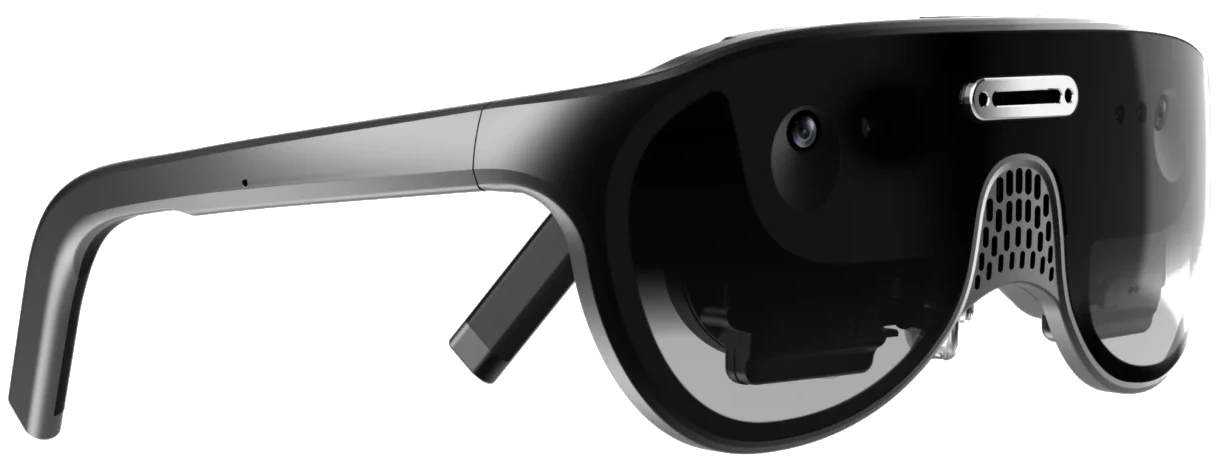
How it is built
Inside any such glasses there is a tiny micro-OLED panel, typically between 0.5 and 1.0 inch, and a lens that projects and magnifies a virtual image. Your eye does not see the panel itself, it sees a magnified optical projection of it.There are two fundamentally different classes of glasses on the market, and they are constantly confused.
Birdbath, optical AR glasses.
The layout is a lens, a flat polarising beam splitter and a curved semi-transparent mirror. You see the real world through glass. This is how XREAL, VITURE, Rokid Max and their clones are built.
Pancake, essentially a VR headset in a spectacle frame.
The optical path is folded by polarisation between two films. Such a module cannot be transparent, because an opaque panel sits behind the optics. You see the real world through cameras, on a screen. This is how Meta Quest works in passthrough mode, and also the recent URXR One.
This distinction matters. If a product description uses the words "spatial", "AR" and "see-through", find out whether it means looking through glass or watching a camera feed. These are two completely different devices.
The key parameter they will not show you
What PPD isForget inches, forget panel resolution, forget the word "4K". Glasses have exactly one measure of sharpness, and it is called PPD, pixels per degree, the number of pixels that fall within one degree of your field of view.
Why this one? Because sharpness is determined neither by the pixel count alone nor by the image size alone, but by the ratio between them. The same 1920x1080 frame can be shown on a screen the size of your palm or on the wall of a house. The amount of detail does not change, only the size of each pixel in your field of view does.
The formula is simple:
PPD = horizontal pixels / horizontal field of view in degrees
Horizontal field of view:
Result:
PPD
Threshold of human vision: 60 PPD
Now let us calculate real devices.
| 55" 4K TV at 3 m: | 167 PPD, excellent |
| FHD+ smartphone at 35 cm: | 110 PPD, very good |
| 27" 4K monitor at 60 cm: | 73 PPD, good |
| Threshold of human vision: | 60 PPD, still okay |
| 27" 1440p monitor at 60 cm: | 48 PPD, it's bearable |
| Glasses 1080p, 50 deg. diagonal: | 44 PPD, poor |
| Glasses 2448x2064, 90 deg. diagonal: | 35 PPD, very poor |
Playing games with the numbers.
The manufacturer of the glasses in the last row of the table quotes about 36 PPD and even gives the formula: 2448 pixels divided by ~70 degrees horizontally. Do the arithmetic yourself: it comes out at 35.0, not 36. The figure 36 appears only if you divide the panel diagonal by the diagonal field of view (3202 / 90 = 35.6). That way the number looks nicer.
Always check which axis a quoted figure refers to, and do the arithmetic yourself. Both numbers, resolution and field of view, must appear in the specification. If they are missing, someone is trying to mislead you.
For example, the URXR One is clearly misleading buyers. The "5K" designation refers to the total number of pixels for both displays! But each eye still sees only 2448 pixels. Horizontally, the field of view of one eye is around 70 degrees: 2448 / 70 ≈ 35 PPD. And that is a very poor result. There is no point in paying $800 for this.
Let's compare the image quality of the main models
The table is sorted by PPD, from best to worst. The main thing it shows: the wider the FOV, the worse the picture. The XREAL One Pro and the URXR One are the most expensive models, advertised as the most "advanced" in their lineups. They have the widest field of view, and they are exactly the ones at the bottom of the quality ranking. All the expensive models are bad.
Same panel, wider angle, bigger pixels. Advertising sells a wide FOV as an advantage, but in terms of quality it is a straight downside! Almost all models use the very same panel with 1920 pixels horizontally. The difference between $400 and $900 models is only the size of the field of view, that is, how far those same pixels are stretched. The XREAL 1S promises 500 inches and delivers 43 PPD, the XREAL One promises 70 inches and delivers the same 43. The number in the ad differs by a factor of seven, the quality is equally lousy.
Comparison devices of image quality calculated by horizontally
| Device | Panel | FOV(h) | Screen | Distance | PPD | Quality |
| FHD+ smartphone | 1170x2532 | 10° | 6.1" | 0.35 m | 110 | excellent |
| 27" 4K monitor | 3840x2160 | 53° | 27" | 0.6 m | 73 | very good |
| Threshold of human vision | — | — | — | — | 60 | good |
| RayNeo Air 3s Pro | 1920x1080 | 41° | 201" | 6 m | 47 | normal |
| RayNeo Air 3s | 1920x1080 | 42° | 205" | 6 m | 46 | mediocre |
| XREAL One | 1920x1080 | 44° | 73" | 2 m | 43 | badly |
| XREAL 1S | 1920x1200 | 45° | 384" | 10 m | 43 | badly |
| VITURE Luma Pro | 1920x1200 | 45° | 115" | 3 m | 43 | badly |
| XREAL One Pro | 1920x1080 | 51° | 171" | 4 m | 38 | poor |
| VITURE Beast | 1920x1200 | 50° | 174" | 3 m | 38 | poor |
| Meta VR Glasses 2026 | 2412x2288 | 70° | 188" | 2.5 m | 34.5 | very poor |
| URXR One | 2448x2064 | 75° | 200" | 2.5 m | 32.7 | worst |
| URXR One, 1080p | 1920x1080 | 75° | 173" | 2.5 m | 26 | terrible |
| Meta Quest 3 | 2064x2208 | 94° | 309" | 2.5 m | 22 | beyond terrible |
| Pico 4 | 2160x2160 | 104° | 356" | 2.5 m | 20.8 | beyond terrible |
| Meta Quest 3S | 1832x1920 | 97° | 322" | 2.5 m | 18.9 | the worst in world |
Why "a 130, 200 or 300... more inch screen" is a deception
This is the most common manipulation in the industry, and it works because inches sound familiar while degrees do not.A virtual screen has no size in inches.
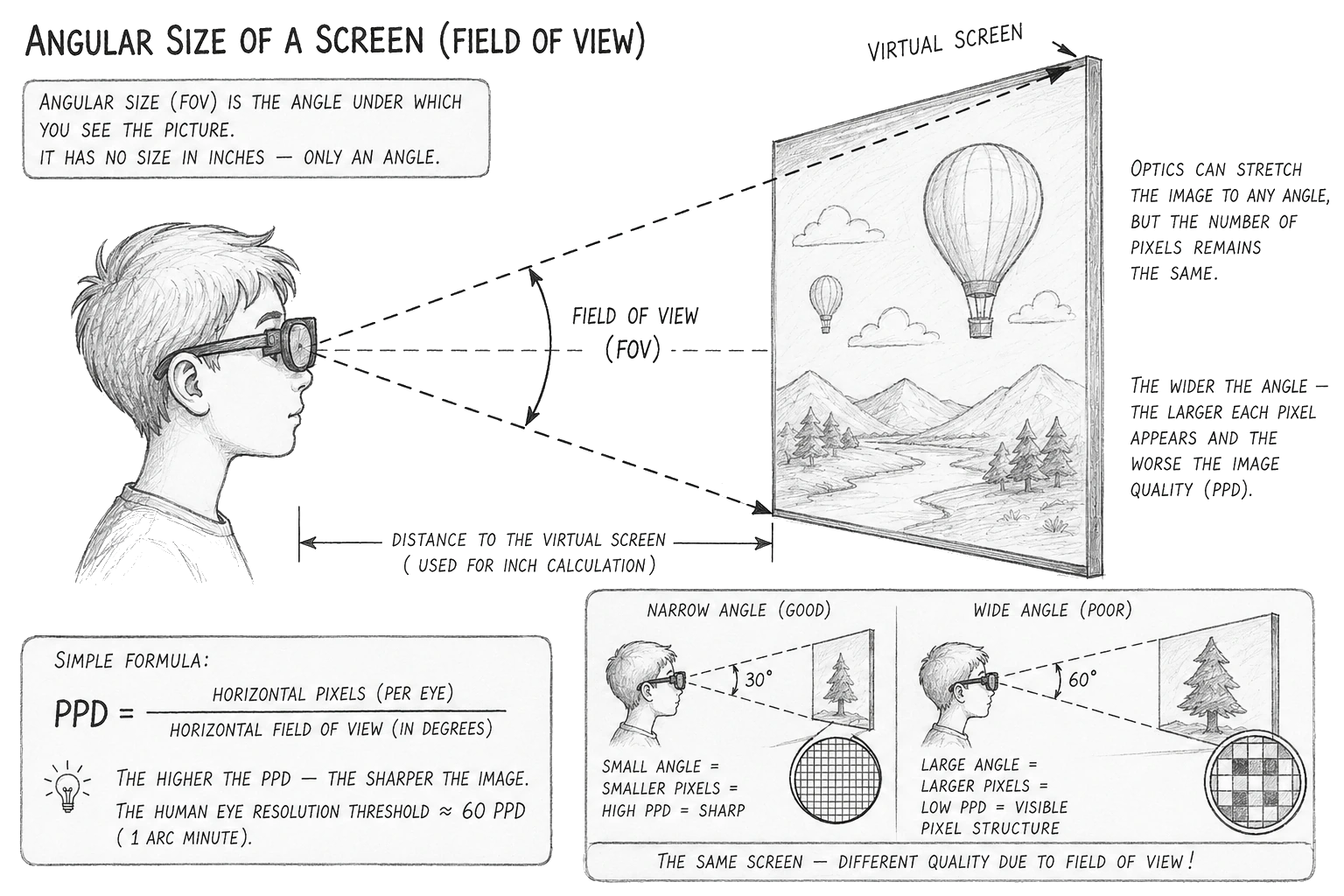
It has only an angular size. The phrase "a 200 inch screen" is meaningless without the second half of the sentence, the viewing distance. 200 inches at 10 metres and 200 inches at 3 metres are completely different pictures in terms of quality. Manufacturers usually pick whichever distance makes the inch figure sound most impressive.
The governing rule: magnifying an image with a lens does not add a single bit of information. Optics can stretch a picture across any angle, but if the panel had 2000 pixels in a row, it still has 2000. Stretching the screen from "100 inches" to "200 inches" does not give you more detail or more sharpness. It gives you pixels twice as large and a PPD figure twice as bad.
An analogy anyone can follow: take a 2 megapixel photograph from an old phone and stretch it across the wall of a house. It will get bigger. It will never get sharper or better.
This is why the "enlarge the screen" mode in such glasses only degrades quality, never improves it. Anyone who has tried them knows that to read text comfortably the screen has to be made smaller. And then you squint at microscopic letters, which is exactly where your eyes give out fastest.
Where 85-90% of the light goes
No near-eye optical scheme delivers the full light output of the panel to your eye. The light passes through a polariser, which immediately costs 50% of the intensity, then reflects off a beam splitter, then off a semi-transparent mirror. Every stage costs optical power. Measurements by optics laboratories give the following figures:| Birdbath, light reaching the eye: | 10.. 15% of panel brightness |
| Pancake, light reaching the eye: | about 10% |
| Diffractive waveguide: | about 0.1% |
| 1000 nit panel through birdbath: | 120 nits at the eye |
| Required indoors: | 300 nits at the eye |
| Required outdoors: | 1200 nits at the eye |
Dark lenses
To make the image visible at all, birdbath glasses block roughly 70-75% of the light from the real world. That is the level of dark sunglasses. You are not augmenting reality, you are looking at the world through a filter. Outdoors in daylight the image becomes translucent, washed out and lifeless.
Black is not black
Micro-OLED by itself has excellent contrast, but in a birdbath layout the light of the room reaches your eye straight through the semi-transparent mirror. The black of a film turns grey. And once again you are being cleverly misled. The advertised 100000:1 contrast refers to the panel, not to what you will actually see. :)
Spatial glasses: you see the world through a camera
The new wave of pancake-optics devices deserves a separate discussion. They are sold with the words spatial computing, 6DoF and high-fidelity video see-through.Technically this is honest: the 6DoF tracking really is there, and windows really can be pinned to a point in the room. But the phrase video see-through means literally this: an opaque panel sits in front of your eyes, and you see the world around you as a video feed from cameras on the housing. These are not AR glasses. This is a VR headset in a spectacle frame.
What that means in practice.
The world in low resolution
Your hands, your keyboard, the face of the person you are talking to, everything around you comes at the same poor PPD as the virtual screen. Few people enjoy that.
Camera dynamic range is far below that of the eye
A window in daylight turns into a white blob, and a dark corner of the room becomes a boiling mess of noise.
Latency
Manufacturers quote 10 ms or slightly less, which is a good figure, but it is nowhere near 1 ms. When you turn your head the world lags behind and swims. It will never line up perfectly.
Geometry
The cameras are not located where your pupils are. Because of this you will misjudge distances to objects. Pouring tea, picking up tools or walking down stairs while wearing such glasses is not advisable. You can injure yourself.
Sharp only in the centre
Perfect lenses do not exist. Good ones cost hundreds of dollars. A cheap lens weighing a few grams, built into a spectacle frame, is by definition a serious compromise. As a result you receive the full set of optical defects, none of which are ever listed in the specifications.Chromatic aberration
Around lines and white letters near the edges you see multiple coloured false contours. Software compensation for this defect is partial and not very effective. The lens splits the light into its spectral components and you see the result. Think of a prism dividing light into a rainbow. The mechanism here is the same.
Distortion and pupil swim
Straight lines near the edges of the image bend, and the character of the bending changes as your eye moves. The brain perceives this as a slight swimming of the world.
A small eyebox
The sharp zone at the pupil is only a few millimetres across. If the glasses slip half a centimetre down your nose, the picture immediately blurs. This is why people constantly push such glasses back into place. You have to sit still like a statue, which is very uncomfortable.
You cannot read with your eyes, only with your head
On an ordinary monitor your gaze travels along the line of text. Here, as soon as the eye rotates, the pupil leaves the sharp zone, and you are forced to turn your head instead. An hour of reading like this tires your neck more than a session at the gym.
Interpupillary distance
People have different head sizes, and therefore different interpupillary distances (IPD). If your IPD does not match the optical centers of the lenses, your eyes are forced to converge unnaturally. Most inexpensive models of display glasses have no IPD adjustment at all.
You simply have to accept whatever spacing the manufacturer gives you. This can lead to loss of focus and significant image distortion. The optical centers of the lenses must be precisely aligned with your pupils.
Glasses over glasses
If you already wear prescription lenses, you will need custom optical inserts, which means extra money and weeks of waiting, or a built-in dioptre adjustment. Astigmatism, incidentally, cannot always be corrected with inserts.
The input limits the resolution
The URXR One, for example, accepts a signal of no more than 2560x1440 from the computer, and the prototypes ran at 1920x1080. The manufacturer announced 1440p support as a "launch upgrade" only during the campaign. Stretch a 1920 pixel frame across the full 70 degree field of one eye: 1920 / 70 = only 27 PPD, no matter how good the panel is. And a 2560 pixel screen does not fit onto the panel one to one at all: that would take ~73 degrees, more than one eye can see. Make the screen 50 degrees wide and it gets only ~1750 panel pixels, fewer than an ordinary Full HD monitor. The picture is resampled, and sharpness is lost.
Everything is learned by comparison
The numbers above can be checked with more than a calculator. This simulator works out what the devices actually do. It takes an ordinary picture and runs it through a simplified mathematical model of the device. Pick your option and compare it with the Original button, where there is not a single defect.What is modelled. First, the pixel size: the frame is resampled to the PPD of the selected device relative to the 60 PPD threshold of human vision. Second, the optics of the glasses: blur growing from the centre toward the edges, the coloured fringes of chromatic aberration, brightness falling off toward the edges and black lifted by stray light. The strength of these defects is scaled by the field of view, because aberrations grow together with the field angle. Monitors have no lenses at all, there only the pixel size matters.
Device:
Picture:
Show:
The important conclusion that only shows up in a comparison
A cheap 24" FHD monitor at 60 cm delivers 40 PPD, formally even worse than the XREAL One with its 43. Switch between them. The monitor has a large pixel and no optics. So the corners are as sharp as the centre, there are no coloured fringes, black is always black and brightness is even. The glasses have the very same pixel size plus the whole remaining bouquet of defects. In other words, PPD covers only part of the problem, not the whole picture.
Stereo: two screens are not yet 3D
This is where the buyer draws the most logical conclusion of all, and gets it wrong. The glasses contain two separate displays, one per eye. No shutter, no polarisation, no losses on separating the views. The perfect layout for stereo, better than a television and better than a projector. So 3D films should run on them natively, right?They do not. The glasses cannot work with stereo at all. They can do exactly one thing: cut in half whatever frame was sent to them. All the work of creating 3D has to be done by somebody else, before the glasses.
What the input accepts
The XREAL One in 3D mode has only two options. Full SBS, a 3840x1080 frame where the two halves sit side by side uncompressed. And Half SBS, an ordinary 1920x1080 frame where each view is squeezed horizontally by two and the glasses stretch it back. The mode is switched by hand in the on-screen menu and must match what is actually inside the file. There is no auto-detection. Get it wrong and you receive either doubling or a vertically stretched mess. Previous generation models were even simpler: switching 3D on turned the glasses into a single 2x1920x1080 monitor, so they understood Full SBS only.
What the glasses do not understand at all
| Frame packing, HDMI 1.4: | no, an external converter is required |
| MVC, the stream of a 3D Blu-ray disc: | no, there is nothing to decode it with |
| Frame sequential: | no, that is the shutter-glasses format |
| Top-and-Bottom: | no, only through the vendor's own box |
| Half SBS 1920x1080: | yes, manually, losing half the pixels |
| Full SBS 3840x1080: | yes, manually, if the source can output it |
Half SBS kills sharpness exactly by two
That leaves Half SBS, the only format that is common enough to matter. And it costs more than it looks. In it each eye receives 960 real pixels horizontally, stretched to 1920. Take the figure from the PPD table above and halve the horizontal component. Instead of 43 PPD you are left with about 21, against a recognition threshold of 60. That same "huge screen" in stereo becomes twice as soft as a picture we have already called poor.
Full SBS preserves sharpness, but it requires the source to output 3840x1080. From a phone there is no way to do that at all. On a computer you have to create a non-standard resolution by hand, and while 3D mode is on, your desktop splits into two halves and you navigate the interface with one eye closed. For games you also need a third-party layer such as geo-11 on top.
How the manufacturer itself answers this
XREAL suggests turning on the REAL 3D feature and converting ordinary flat video into 3D on the fly, so that you, quoting the advertising, "do not have to hunt for 3D content". The admission has been made for us: there is no content in the required format, and there is certainly no honest way to show it. What a primitive piece of software will draw instead of a second view that never existed in the clip, you can probably already guess. The "quality" will make you sick.
About the quality of conversion
Only very sophisticated 3D converters can produce a good 3D conversion. They run on serious GPUs on a PC and take a long time. A ten minute clip, for example, can take two or three hours to process. Real time inside the glasses is out of the question, it is a lie. Simple devices simply do not have the computing power for it.
The bottom line
Display glasses are not a 3D device. They are a monitor with a frame splitter. Everything that makes an image three-dimensional, that is parsing the media container, decoding the views, bringing them to the right geometry and synchronising them, must be done by someone before the glasses. A player, a driver or an additional computer. The hardware inside the glasses is meant for display only. The work of forming the image has to be done by somebody else.
DRM / HDCP: there will be no paid content
Netflix and other services do not work over a direct connection because of DRM content protection restrictions. This is a common problem for most budget glasses. DRM (Digital Rights Management) is protection against unauthorised copying and distribution. The media can only be played by specifically authorised applications or devices. Only large companies can obtain a DRM licence and it is very expensive. So small manufacturers will have no streaming media, do not believe the promises. A person buys a "cinema on a plane" and then suddenly discovers that the cinema part is over.For 4K/HDR, Netflix requires HDCP 2.2+. If the player fails the verification, you will get a black screen. If your glasses do not support HDCP or use an older version, you will get 1080p or 720p, or in the worst case, a black screen. We could not find any mention of HDCP support in the specifications of the URXR One.
Will You Really Be Able to Watch and Work While Traveling?
Don't worry - you won't... At least not comfortably. Text work is simply out of the question. There is another major problem that sellers rarely mention, and buyers usually discover it only after they are already on the road. And this problem destroys one of the main dreams people buy these glasses in the first place: watching movies on a train, bus, in a car, or on a plane.The main problem is mechanical, not electronic
Remember the small eyebox we discussed above. The sharp-focus zone around your pupil is only a few millimeters wide. Yet the glasses rest on your nose and ears, soft tissue and weigh 100 grams, with a cable pulling them downward and sideways. Every bump, rail joint, or pothole makes the entire assembly move relative to your skull. Your pupil leaves the sharp-focus zone.
The image doesn't merely shake. It loses sharpness and brightness: it becomes blurry, darkens toward the edges, and develops colored fringes and geometric distortions. One second the glasses are back in position; two seconds later they've moved again. Your eyes are constantly trying to find a focus that simply isn't there.
This is fundamentally different from using a phone. When you hold a phone in your hand while moving, it shakes with you but remains in focus, and your eyes can easily follow it because the screen is relatively far away. With glasses, even a tiny movement of just a few millimeters can throw the display out of focus. These are completely different situations.
In the end, watching through such glasses while traveling can feel like watching a screen on a vibration table: even small external vibrations can cause ghosting, double images, and constant refocusing.
The only real way to solve this is to fix the device rigidly to your head essentially using a head strap instead of temple arms. But then they're no longer really glasses, they're a headset. And the whole point of having a lightweight frame is lost. There is no software fix for this problem. The optics have no way of knowing exactly where your pupil is and dynamically adjusting the image to match it. At this point, the only thing that would really help is a leather muzzle, like the one you put on a dog.
The second problem is virtual-screen drift
The gyroscope and accelerometer inside the glasses measure movement relative to the planet ground, not relative to your seat on an airplane. They simply cannot physically distinguish between you turning your head and the vehicle itself turning. Position-tracking cameras don't solve the problem either. They track the cabin around you, but the cabin itself is moving. The virtual screen, which is supposed to remain fixed in space, starts drifting sideways every time the vehicle turns, accelerates, or brakes. This will start driving you crazy within about 15 minutes.
The severity of the problem depends on the operating mode. If the image is rigidly attached to your head, there is no drift, but there is no virtual monitor either. The problem appears in Anchor, 3DoF, and 6DoF modes, precisely the modes for which people buy these devices in the first place.
Manufacturers themselves acknowledge the problem. Apple introduced a dedicated Travel Mode for Vision Pro. Without it, if tracking is lost, the display simply goes dark with a "Tracking Failed" warning.
Apple's official recommendations specifically cover airplanes and trains. Car travel is considered too unpredictable, while subways and commuter trains suffer from the same problem because of their frequent stops and starts.
VITURE advertises its car mode with the claim that the "screen stays stationary regardless of vehicle movement, preventing motion sickness." That's essentially a direct admission that without such a mode, the screen does not stay stationary.
You're going to throw up
Even if you manage to stabilize the image, there is still a conflict with your vestibular system. Your eyes see a stationary screen while your inner ear feels acceleration, braking, turns, and vibration. This is the classic mechanism behind motion sickness, and with glasses, it can be significantly worse than simply reading a book.
With a book, you can still see the real world around you. With glasses, you can't. The virtual world in front of your eyes may be moving in a completely different way from what your body is actually experiencing. After a while, you're going to feel sick.
Strain on the eyes: what is firmly established
What is proven and universally acceptedVergence-accommodation conflict, VAC.
This is the central physiological problem of all such devices. In nature, when you look at a nearby object, your eyeballs turn inward, which is vergence, and at the same time the lens of the eye tightens to focus, which is accommodation. The two processes are firmly coupled from childhood. In display glasses the optics fix the focal distance at a single plane, usually 2 to 6 metres, while the convergence of your eyes depends on the apparent distance of the virtual object. The brain receives contradictory signals. This is a recognised cause of visual fatigue, headache and nausea during prolonged use.
Reduced blink rate and dry eyes.
When you stare intently at a bright source, your blink rate drops and the tear film is not renewed. A gritty sensation and redness are common. It is the same mechanism as working at a monitor, but more pronounced.
Measurable short-term effects.
Studies on children and adolescents record fatigue after VR sessions, increased esophoria, reduced near visual acuity and a temporary myopic shift. These effects pass shortly after the device is removed.
The bottom line on health
Such glasses will almost certainly not ruin your eyesight quickly, but they are very likely to cause fatigue, soreness and headache after 30 to 60 minutes of use. That is precisely why most buyers use them a handful of times and then leave them on a shelf for good.
A direct comparison with an ordinary monitor
| Sharpness, 27" 4K monitor: | 73 PPD |
| Sharpness, display glasses: | 27.. 48 PPD |
| Edges of the frame, monitor: | as sharp as the centre |
| Edges of the frame, glasses: | sharp degraded, +aberration, +distortion |
| Black level, monitor: | true black |
| Black level, glasses: | grey, stray light |
| Panel light reaching the eye, monitor: | about 100% |
| Panel light reaching the eye, glasses: | 10.. 15% |
| Focus, monitor: | free, the eye is at rest |
| Focus, glasses: | fixed, VAC conflict |
| Reading text, monitor: | by moving the eyes |
| Reading text, glasses: | by turning the head |
| Several hours of work, monitor: | fine all day |
| Several hours of work, glasses: | fatigue within 30.. 60 min |
| Price, monitor: | from $150 |
| Price, glasses: | $300.. 900 plus accessories |
The real price: what the price tag leaves out
The light weight of such glasses is achieved not by engineering brilliance but by a simple trick: the processor and the battery have been removed from the housing. A weight of 90 to 100 grams means a frame with no signal processing of any kind. The device still needs a powerful processor to drive the video, and you will still have to carry it on you.DisplayPort Alt Mode
The glasses hard-require DP Alt Mode. XREAL with NRSDK 2.3.0, for instance, cut the list of supported phones down to Samsung flagships. The connection runs over USB-C in this specific mode. Support for it is far from universal among phones and laptops. Check your particular device by model number, not by the presence of a USB-C connector. There is no Wi-Fi here: the glasses contain neither a processor nor a battery, and wireless transmission would require both, as well as adding compression and latency. You will have to pay a serious premium for a device with DP Alt Mode.
Poor sound
It is sold as "all in one", but in practice you will still need headphones: in noisy places, in any kind of vehicle. Because of the small size, the lack of isolation and the low speaker power there is simply not enough of it. You will have to use separate headphones for decent audio. In other words, the feature is practically useless.
No focus
Focus cannot be found in principle, and not only at the edges. The One Pro has three discrete IPD positions, and the PhoneArena reviewer states it plainly: not one of the settings worked. Blur is always present, and in the moments when the focus happened to line up, sharpness was good only in the centre. Viture owners say the same thing: they wish the lenses had a bigger sweet spot. It is a lottery every time you put them on, hoping the pupil lands inside the sharp spot.
Raw firmware and bricked units
One owner describes the problem. On the very first launch, straight after purchase, the app demanded a firmware update, the link with the phone broke in the middle of the process, probably because of a bad contact in the connector. The glasses stopped responding, no button combination helped, the device was dead. For the XREAL One Pro in their review: switching to Ultra-Wide reliably crashed and restarted the device, and the picture kept staying skewed to the left.
If you buy a fresh device from a startup, you will inevitably have to update the firmware several times. Every time there is a huge risk that the device turns into a pumpkin. And where do you send it then? Right, into the bin...
External battery
Phones cannot supply the power that bright displays and this kind of load demand. On a Samsung S21 Ultra the drain is roughly 5% of the battery per ten minutes, that is about two hours from a full charge. You cannot watch and charge at the same time either, that needs a special hub or dock. Manufacturers sell the battery pack as a separate paid accessory, typically around $70, and that means another 300 grams in your pocket and a second device that needs charging as well.
Cables
Nothing works without cables, which should be obvious to anyone. You will constantly snag the cable on things around you, and the glasses will be pulled off your head and damaged. You will not be able to watch lying down either, because the connector presses against the pillow and pushes the glasses off your nose. There is only one option left, to sit still like a statue.
The vendor application
The full feature set often works only through it, and only on some platforms. iOS and Android versions are usually promised for later. Once the money has been collected, however, those promises are frequently forgotten, and you will wait for nothing.
The small items
Prescription inserts, a headstrap, a case, adapters, all of that adds to the bill. Count the final total, not the number on the banner.
Questions to ask before buying
Put these questions to the seller. If there is no sensible answer, that is an answer too.What is the resolution and the horizontal field of view?
Divide one by the other and you have the PPD. Below 45 and text will be hard to read. Do not accept the word "4K", ask for the physical pixel count per eye.
Is the see-through optical or through cameras?
A single question that separates AR glasses from a VR headset in a frame.
What is the brightness at the eye, not the brightness of the panel?
Indoors you need around 300 nits, outdoors around 1200.
Is there IPD adjustment?
And what range of interpupillary distance is supported. You need the optical centers of the lenses to align precisely with the distance between your pupils.
What about prescription lenses?
Are inserts included, sold separately, or not available at all.
Is my particular laptop or phone supported?
And does it require the additional battery pack.
Are there real photographs taken through the lens?
Not renders, not a screenshot of what you are supposed to see, but an actual photograph taken by a camera placed where the eye would be. If neither the manufacturer nor the reviewers have such images, that is a clear red flag. Do not buy.
What are the return terms and the return period?
Comfort in these devices is highly individual, and there are already plenty of complaints. The right to return the product after an hour of use is worth more than any discount.
A separate word on crowdfunding
Kickstarter is not a shop. Nobody guarantees you a result. In many cases you receive a low-quality, half-finished device with no way to get your money back.
Conclusion
Display glasses are engineering full of compromises, and they are sold with the drawbacks left unmentioned, without any guarantees. Largely relying on the technical illiteracy of buyers. They can see that the image quality is poor, but they are unable to explain what exactly is wrong with it.The law of optics from which everything else follows reads as follows: magnifying an image with a lens does not create information that is not in the panel. A huge virtual screen is not a large high-quality screen like a cinema, and not even the equal of an ordinary display.
Do not buy them if you want to:
Get TV-level image quality - you won't get it
Replace your monitor for working with text and code - it won't work
Use the glasses comfortably for several hours at a time - you won't
Watch media while traveling or in a moving vehicle - you won't be able to
Get a sharp image across the entire frame - you won't get that either
You may buy them if you need to
Watch movies while sitting in a chair, have a private screen in a shared space, or experiment with this technology while understanding its limitations. They may also make sense if you have the option to return the product quickly.
If your goal is high-quality image, including 3D
An ordinary display beats any display glasses on every measurable parameter, except portability. This is not the author's personal opinion. It is dictated by the laws of optics and the mathematics of PPD. Want to argue with the math? Good luck...
Sources
KGOnTech, birdbath optics teardown and light-loss measurements
Information Display SID, optical efficiency of AR and MR architectures
Systematic review, virtual reality and myopia
Road to VR, specifications of current pancake-optics glasses
XREAL, documentation for the 3D mode
Unseen Reality, URXR One FAQ: power, cooling
MRTV, URXR One review: FOV, fan noise
Homepage
Terms & Conditions
About Us
Privacy Policy
Business Info
Contacts
Payment
Shipping
Send Msg
 S3D
S3DSingapore 2026